
A virtual tabletop for maps, fog, dice and turn-by-turn combat
Virtual tabletop
One live board for the DM and every player
BestVTT is a browser tabletop for D&D 5e. The DM and the players share one live board: maps and walls, tokens with hit points, fog that lifts as the party explores, dice everyone can see, and an initiative tracker that runs the fight a turn at a time.
Log inBestVTT is a private project for one table. There is no public account creation: players need an existing account on this server, log in, and then open the invitation link their DM shares. The link grants access to a room; it does not create an account.
01 / Maps and floors
Drop a map, fit it to the grid
Drag an image onto the board to upload and place it, or pick one from the Assets manager. The DM-only Map tool then resizes the image to fit the grid, either by a number of cells or by pixels.
- Grids: Squares, Pointy Hexagons or Flat Hexagons. A new location starts as a 25×25 board of 5 ft squares.
- Layers: map, tokens, dm and fog-of-war layers. Players can only select and move shapes on the tokens layer; the dm layer is invisible to them.
- Floors: stack Underground, Ground and Air floors in one location. The DM can hide a floor from players until it matters.
- Tools: Draw (square, circle, polygon, brush and text), a Ruler with Share with table and Snap to grid, spell templates (Cube, Sphere, Cone and Line on squares; Hex, Cone and Line on hex grids), and a ping you hold P to show.
Optionally, the DM can open the Cartographer, describe a scene, press Conjure, preview the result and place it on the table after a confirmation. Maps come out at 1750×1750 pixels and are saved as regular assets in a Generated Maps folder.
02 / Tokens
Monsters in a keystroke, heroes with trackers
The DM presses Ctrl/Cmd+K to open the bestiary palette, searches the SRD creatures and places one; the token snaps to its size category. Repeat placements are numbered automatically: Goblin, Goblin 2, Goblin 3. A creature without art gets a lettered circle instead.
- Trackers such as HP can be drawn as a bar under the token and set public or private.
- Auras have a bright and a dim radius, and can act as a light source.
- Condition badges show at a glance who is prone, poisoned or frightened.
- Access to edit, move or see through a token is set for everyone or granted per player, and the server enforces it.
03 / Vision, light and fog of war
Walls that block sight, fog that lifts
Any shape can be marked Blocks vision/light (No, Complete or Behind) and Blocks movement, so a drawn wall stops both line of sight and tokens. The DM can also upload an SVG of walls from the Map Arcana settings. A token aura that is a light source lights up what it can reach.
- Per-location settings: fill the entire canvas with fog, only show lights in line of sight, fog opacity, and minimum and maximum vision range in feet.
- The DM paints reveal and hide areas on the fog with the Draw tool.
- Preview as Player shows the DM the table exactly as the players see it.
- Players with several tokens use the Vision tool to choose which ones they see through.
04 / Dice
Real formulas, shared the way you choose
The dice tool, Cast the bones, takes formulas like 2d20kh1 + 3: any die from d4 to d100, addition and subtraction, keep or drop highest and lowest, minimum and maximum limits, rerolls and exploding dice. Optional 3D dice can be switched Off, On, or rolled into a Box.
- Share with: All, DM or None. DM keeps the result from the other players; the DM still sees it. The server applies the choice before sending the roll to anyone.
- Shared rolls land in chat as cards.
- Ability checks, saves and skills on a character sheet roll 1d20 plus the modifier straight into chat.
05 / Initiative and combat
Turn by turn, strike by strike
Right-click a token and choose Add initiative, or select a group and choose Add all to initiative. Each one rolls d20 plus its DEX modifier; typing a value overrides the roll. The tracker keeps a round counter, an End Turn button and turn announcements in chat, and shows each combatant's Action, Bonus Action and Reaction pips and remaining movement.
- Strikes roll against the target's AC. A natural 20 doubles the damage dice and a natural 1 misses. Damage comes off the HP tracker and an attack card is posted to chat. When a player strikes, the DM calls Hit or Miss.
- Damage and healing, the 15 SRD conditions, and a Concentrating badge on the token.
For example, a goblin's Scimitar is +4 to hit for 1d6+2 slashing, straight from its SRD stat block.
06 / Characters (campaign rooms)
Forge a hero, play from a live sheet
When a room is backed by a campaign instance, players get a hero forge and live sheets. Choose Your Hero offers premade heroes or Forge Your Own, a six-chapter creator: Your Blood, Your Calling, Your Past, Your Name, Your Gifts (standard array or rolled scores) and The Forge.
- The live sheet shows Armor, Hit Points and Speed, abilities, saves, Skills, spells, and a Pack with a Coin Purse.
- The Grimoire tracks spell slots, which only the sheet's owner can spend.
- On a phone, table mode splits the hero into Hero, Spells, Pack and Table tabs, with death saves and an Advantage or Disadvantage stance for the next roll.
- From the DM console, the DM can ask players for checks and bestow items.
In rooms without a campaign, tokens, trackers, dice and initiative still work; the forge and the sheets are the campaign-dependent parts.
07 / Run it yourself
Built for a human DM first
Everything above is run by a person behind the screen: a human DM always runs the game. The Cartographer and NPC Forge help with prep.
- DM-only controls: the dm layer, fog painting, hidden floors, the Map tool and the bestiary palette.
- The Invitation URL, and a button to refresh its code, live in the DM settings. Invitees must already have an account and be logged in.
- In campaign rooms, players can browse a read-only Lore Compendium with the DM's spoilers filtered out.
08 / An example
A crypt, two goblins and a sneaking rogue
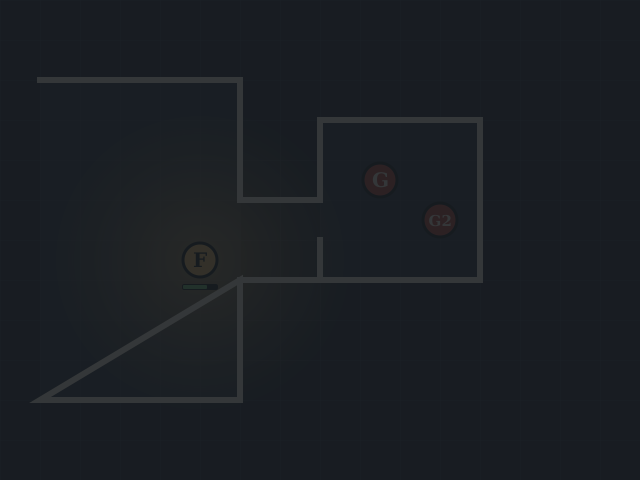
- The DM drops a crypt map onto a 25×25 square grid and fits it with the Map tool.
- They draw the crypt walls with Blocks vision/light set to Complete and turn on fog, so the party sees only what their torch reaches.
- Cmd+K, “goblin”, twice: Goblin and Goblin 2 appear in the side chamber.
- The DM selects everyone and clicks Add all to initiative.
- On its turn a goblin swings its Scimitar at the fighter: 17 against AC 16 is a hit, and 1d6+2 comes off the fighter's HP bar.
- The rogue rolls
2d20kh1 + 5for Stealth with sharing set to DM, so the other players don't see the result.
09 / Honest limits
What it is and isn't
- A private project for one table. It is not open source and there is nothing to download or install.
- There are no plans, prices or licences on offer.
- No public account creation: playing needs an existing account on this server plus an invitation from the DM.
- The Cartographer and NPC Forge require setup by the host.
- The hero forge, character sheets and lore need a campaign instance.
- Rules content is the D&D 5e SRD.
Already at the table?
Log in and open your room, or see how the tabletop companion brings phones to an in-person table. Back to the BestVTT home page.
Log in